
- AI Platforms & Assistants
- OpenAI
- ChatGPT
Don’t leave your data unprotected
When you purchase through links on our site, we may earn an affiliate commission. Here’s how it works.
 (Image credit: QuitGPT)
- Copy link
- X
- Threads
Sign up for breaking news, reviews, opinion, top tech deals, and more.
Contact me with news and offers from other Future brands Receive email from us on behalf of our trusted partners or sponsors By submitting your information you agree to the Terms & Conditions and Privacy Policy and are aged 16 or over.You are now subscribed
Your newsletter sign-up was successful
An account already exists for this email address, please log in. Subscribe to our newsletterThe rush to quit ChatGPT after OpenAI’s controversial Pentagon deal may have cooled (the app is already back at the top of the App Store charts) but some users are still leaving.
At least one senior OpenAI manager resigned over the agreement, and CEO Sam Altman has since admitted the deal was "rushed" and has revised parts of it.
ChatGPT quitters seem eager to reward Anthropic for its refusal to bow to the Department of Defense’s demands for unrestricted use of AI by switching to Claude en masse. However, Claude’s more limited access to its most powerful models, compared to ChatGPT’s all-you-can-eat buffet, may have come as a shock to many — although it might actually be a good thing.
Article continues below You may like-
 5 things nobody tells you when you move from ChatGPT to Claude
-
 ChatGPT-4o is going away on Feb 13 — here are 5 ways you can survive the end
-
 The 'cancel ChatGPT' trend is growing after OpenAI's US military deal
Gone for good
If you’re thinking about quitting ChatGPT, don’t just delete your account. There are a few important things you should do first to protect your data and avoid losing information you might want later.
In particular, you may want to export your ChatGPT data, copy your stored memories, and delete your chat history before closing your account — below you'll find details of how to do all three.

1. Import your memories into Claude
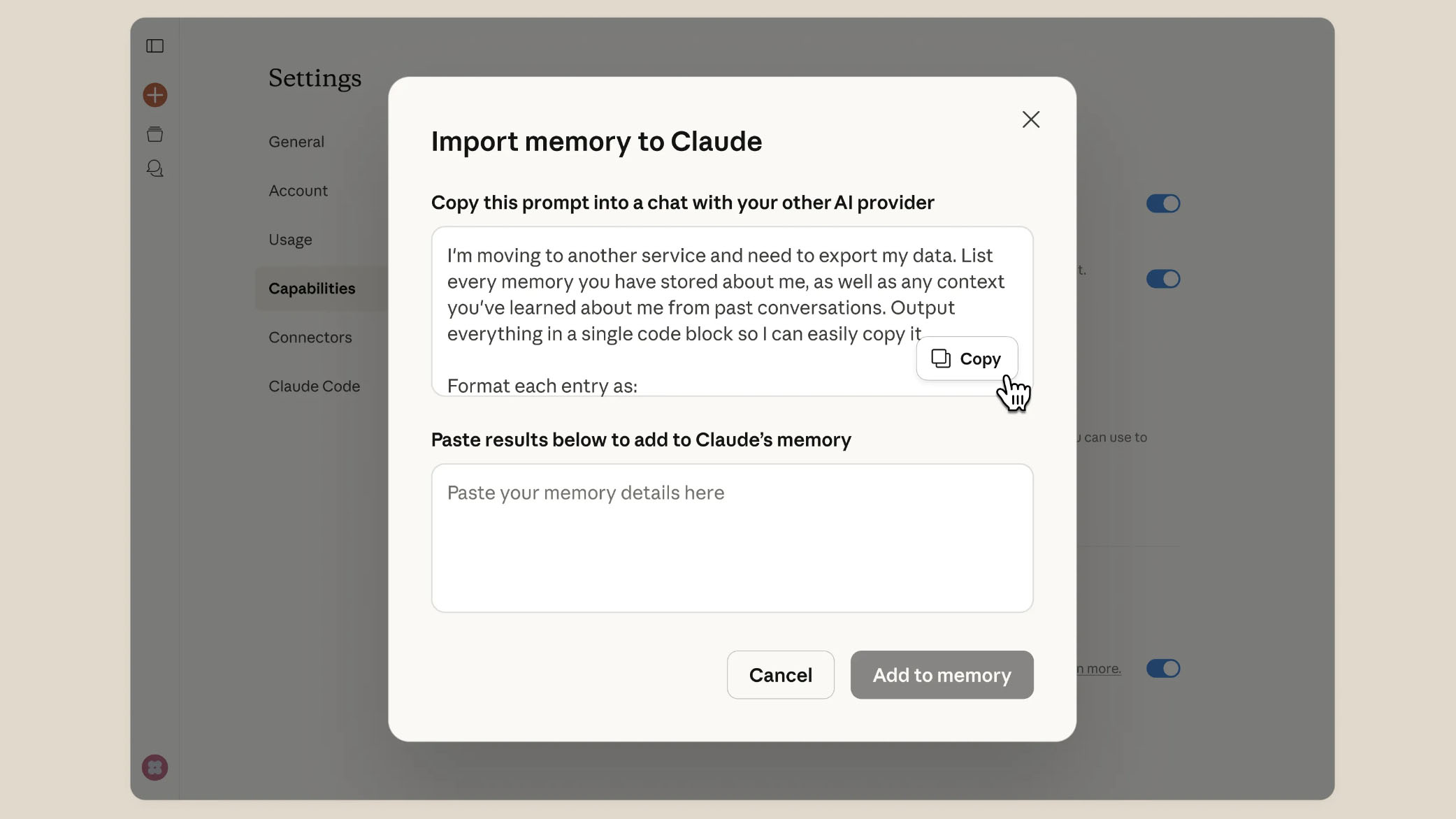
If you’ve chosen Claude as your replacement for ChatGPT, you’ll be pleased to learn that it comes with a menu option for importing your memories (the things ChatGPT remembers about you across chats) into your new chatbot.
You might be hoping that you can just press a button and it will be done automatically, but it’s a little more complicated than that — and a bit messier.
Get daily insight, inspiration and deals in your inboxContact me with news and offers from other Future brandsReceive email from us on behalf of our trusted partners or sponsorsBy submitting your information you agree to the Terms & Conditions and Privacy Policy and are aged 16 or over.When you first open Claude, it will ask if you’d like to use its memory feature. Choose 'Use memory.' Then, in the web interface, click your name at the bottom-left of the screen. Choose Settings, then Capabilities from the menus that appear.
In the Memory section you’ll see an option to Import memory from other AI providers. Click Start Import. You’ll see a piece of text that you’re asked to copy and paste into ChatGPT. This will prompt ChatGPT to reveal all your stored memories. Paste the results into the box provided.
2. Grab your data
You don’t have to, but you may want to get a copy of all your ChatGPT data before you pull the plug on your account. The good news is that you can download everything, but the bad news is that you can’t get it instantly — you have to submit a request.
What to read next-
QuitGPT challenges OpenAI with a subscription revolt
-
Users are flocking to Claude then realizing they can’t use it the same way
-
 Sam Altman regrets rushed defense deal as ChatGPT uninstalls surge by 295%
OpenAI can take a while to process that request, but it will email you a download link after a few days. The link expires 24 hours after you receive it.
To request the link, click on your profile icon in the bottom-left corner of the ChatGPT web interface, then select Settings, and Data Controls. Click the Export button next to the Export data option, then follow the on-screen instructions.
3. Delete all chats
Obviously we’d recommend following step 1 first, but it is possible to delete all your chat data before you quit ChatGPT if you want to be sure that nothing remains after you leave.
To do this, head back to the Data Controls settings and click Delete all, which is next to the Delete all chats option.
Be aware that while a deleted chat is immediately removed from your chat history view, it can take OpenAI up to 30 days to actually delete your chats after you select this option. However, that doesn’t mean you can restore a chat once you select it — there’s no going back.
Follow TechRadar on Google News and add us as a preferred source to get our expert news, reviews, and opinion in your feeds. Make sure to click the Follow button!
And of course you can also follow TechRadar on TikTok for news, reviews, unboxings in video form, and get regular updates from us on WhatsApp too.
TOPICS AI CATEGORIES Claude Graham BarlowSocial Links NavigationSenior Editor, AI
Graham is the Senior Editor for AI at TechRadar. With over 25 years of experience in both online and print journalism, Graham has worked for various market-leading tech brands including Computeractive, PC Pro, iMore, MacFormat, Mac|Life, Maximum PC, and more. He specializes in reporting on everything to do with AI and has appeared on BBC TV shows like BBC One Breakfast and on Radio 4 commenting on the latest trends in tech. Graham has an honors degree in Computer Science and spends his spare time podcasting and blogging.
View MoreYou must confirm your public display name before commenting
Please logout and then login again, you will then be prompted to enter your display name.
Logout Read more
ChatGPT-4o is going away on Feb 13 — here are 5 ways you can survive the end
QuitGPT challenges OpenAI with a subscription revolt
Users are flocking to Claude then realizing they can’t use it the same way
Sam Altman regrets rushed defense deal as ChatGPT uninstalls surge by 295%
 Why I won't use ChatGPT Health
 The true emotional cost of retiring ChatGPT-4o
Latest in ChatGPT
The true emotional cost of retiring ChatGPT-4o
Latest in ChatGPT
 I tested Shazam in ChatGPT – and it makes creating playlists frictionless
 Sam Altman admits OpenAI still needs to fix these 3 ChatGPT-5.4 weaknesses
 ChatGPT has delayed the roll out of its adult mode again — here's why
Users are flocking to Claude then realizing they can’t use it the same way
ChatGPT has delayed the roll out of its adult mode again — here's why
Users are flocking to Claude then realizing they can’t use it the same way
 OpenAI introduces ChatGPT 5.4 Thinking for solving bigger problems
 'Straight up lies': Anthropic CEO attacks OpenAI's US military deal
Latest in Features
'Straight up lies': Anthropic CEO attacks OpenAI's US military deal
Latest in Features
 I tried Australia's favorite VPN for 24 hours — and it's only a few improvements away from being a superb free VPN
I tested Shazam in ChatGPT – and it makes creating playlists frictionless
I tried Australia's favorite VPN for 24 hours — and it's only a few improvements away from being a superb free VPN
I tested Shazam in ChatGPT – and it makes creating playlists frictionless
 How to tell if your kids are using a VPN - and should you be worried?
 Stream the first 5 minutes of Virgin River season 7 episode 1 for free now
 Still choosing between Pokémon FireRed and LeafGreen on Nintendo Switch or Switch 2? Here’s something you might not have considered
 Sonos' CEO explains what went wrong with the app, and what's being fixed
LATEST ARTICLES
Sonos' CEO explains what went wrong with the app, and what's being fixed
LATEST ARTICLES- 1The Nintendo Switch 2 has a new worst accessory in the Virtual Boy — the best place for it is on your shelf
- 2OpenAI reportedly building a GitHub alternative after saying Microsoft-owned platform is 'not yet meeting our expectations'
- 3Burson's Stellar headphone amps promise head-fi heaven in spacecraft-inspired Star Wars style
- 4'Creating a fully keyboard-accessible site...isn’t free; it requires a lot of work and knowledge': Microsoft is making it easier to build complex websites without a mouse
- 5'The fastest desktop gaming processors Intel has ever built': new Arrow Lake Refresh CPUs are priced to sell, and AMD should be worried