
TechRadar Verdict
Not the greatest screen I’ve ever tested, but probably the most flexible. That it comes with all the cables, a cover and a Bluetooth keyboard at this price point is impressive cost control by UPerfect.
Check Amazon Singapore Check Lazada Singapore Pros- +
Wired and wireless input options
- +
Lots of accessories
- +
Inexpensive
- +
Battery powered
- -
Single-source backlight
- -
Awkward stand arrangement
- Best portable monitor of 2025
- Best portable projector of 2026
- The best gaming monitor 2025
Why you can trust TechRadar We spend hours testing every product or service we review, so you can be sure you're buying the best. Find out more about how we test.
Jump to:- 30 second review
- Price & availability
- Specs
- Design
- Performance
- Final verdict
- Report card
- Should you buy it?
UPERFECT UFree V: 30-second review
This isn’t the best monitor in the world, but it’s one that should work with almost anything that outputs a display, and it's easy to carry.
It’s pitched squarely at remote workers, frequent travellers, and anyone who wants an ad hoc second screen without the faff of setting one up.
The headline feature is UPerfect's proprietary UFree wireless technology. Rather than relying on Bluetooth pairing or a Wi-Fi connection, the system uses a USB-C transmitter to cast your screen wirelessly, with no drivers, no pairing process, and no waiting around. It is a plug-and-play approach that, on paper at least, removes the usual friction of getting a portable monitor up and running. The wireless signal can operate at up to 13 metres, which should comfortably cover most office and café scenarios.
According to the company, this IPS panel delivers a 1920x1080 resolution, a 178-degree viewing angle, 350 nits of brightness, a 1500:1 contrast ratio, and covers 125% of the sRGB colour gamut. Although my testing suggests some of those numbers are wildly optimistic.
Low blue light technology is also built in, aimed at reducing eye strain during longer sessions.
Portability is central to this proposition. The monitor weighs just 0.79kg and measures a mere 5.5mm thick, making it genuinely slim enough to slip into a bag alongside a laptop. Crucially, an 8,000mAh built-in battery provides around four hours of use on a single charge, meaning you are not dependent on finding a power socket.
Are you a pro? Subscribe to our newsletterContact me with news and offers from other Future brandsReceive email from us on behalf of our trusted partners or sponsorsBy submitting your information you agree to the Terms & Conditions and Privacy Policy and are aged 16 or over.Connectivity extends beyond wireless, with full-featured USB-C, mini HDMI, and a 3.5mm audio output, making it compatible with laptops, smartphones, and game consoles. Whether the wireless technology lives up to its promises in real-world conditions is what this review sets out to find out.
If only for its low-price, this is an obvious candidate for one of the best portable monitors.
UPERFECT UFree V: Price and availability

- How much does it cost? $190/£142/€164
- When is it out? It available now
- Where can you get it? Direct from UPerfect or via online retailers like Amazon
The UPerfect UFree V is available from the UPerfect website, and online retailers including Amazon.com and Amazon.co.uk.
Direct from the maker, the UFree V is $189.99, £141.53 or €163.55, depending on where in the world you are. However, there is currently a spring sale that can reduce the cost by another 12% off, reducing the UK cost to only £124.55. There are also deals for corporate and bulk purchases, so this hardware can be extremely cheap.
For US customers, it can be found on Amazon for only $159.99, although that version doesn’t include the Bluetooth keyboard. It’s also on European Amazon sites, and from amazon.co.uk, it can be found with a voucher for £129.99.
If you didn’t guess already, this product is also sold under a wider range of brand names, and I can’t say with any certainty that UPerfect is the primary source. However, most other brands selling displays with almost identical specifications are asking slightly more.
This is a slice of the market that the branded monitor makers are staying well clear of, since the margins for a display like this must be paper-thin.
- Value: 5 / 5
UPERFECT UFree V: Specs
Swipe to scroll horizontallySpecification
Value
Model
Ufree V
Screen Size
15.6 inches
Resolution
1920 × 1080 (Full HD)
Panel Type
IPS
Quoted Brightness
350 cd/m²
Quoted Contrast Ratio
1500:1
Quoted Colour Gamut
125% sRGB
Colour Depth
16.7M (8-bit)
Viewing Angle
178°
Refresh Rate
60Hz
Response Time
30ms
Screen Type
Matte
Pixel Density
141 PPI
Wireless Technology
UFree (proprietary, no Bluetooth/Wi-Fi required)
Wireless Range
Up to 13m (45ft)
USB-C (A/V Input)
1× Full-featured
USB-C (Power Input)
1×
HDMI
1× Mini HDMI (Audio & Video Input)
Audio Output
3.5mm AUX
Battery Capacity
8,000mAh (built-in)
Charge Time
2 hours
Battery Life
Up to 4 hours
Rated Power
8W
Built-in Speakers
2× 8Ω 1W
Dimensions
356 × 226 × 5.5mm
Weight
0.79kg (1.73 lbs)
Material
ABS
VESA Mount
75 × 75mm (M4)
Touch Screen
No
HDR
No
FreeSync
No
Driver Required
None (plug-and-play)
Included Accessories
Bluetooth keyboard, 2× USB-C cables, 1× Mini HDMI cable, power adapter, carry bag, manual
UPERFECT UFree V: Design
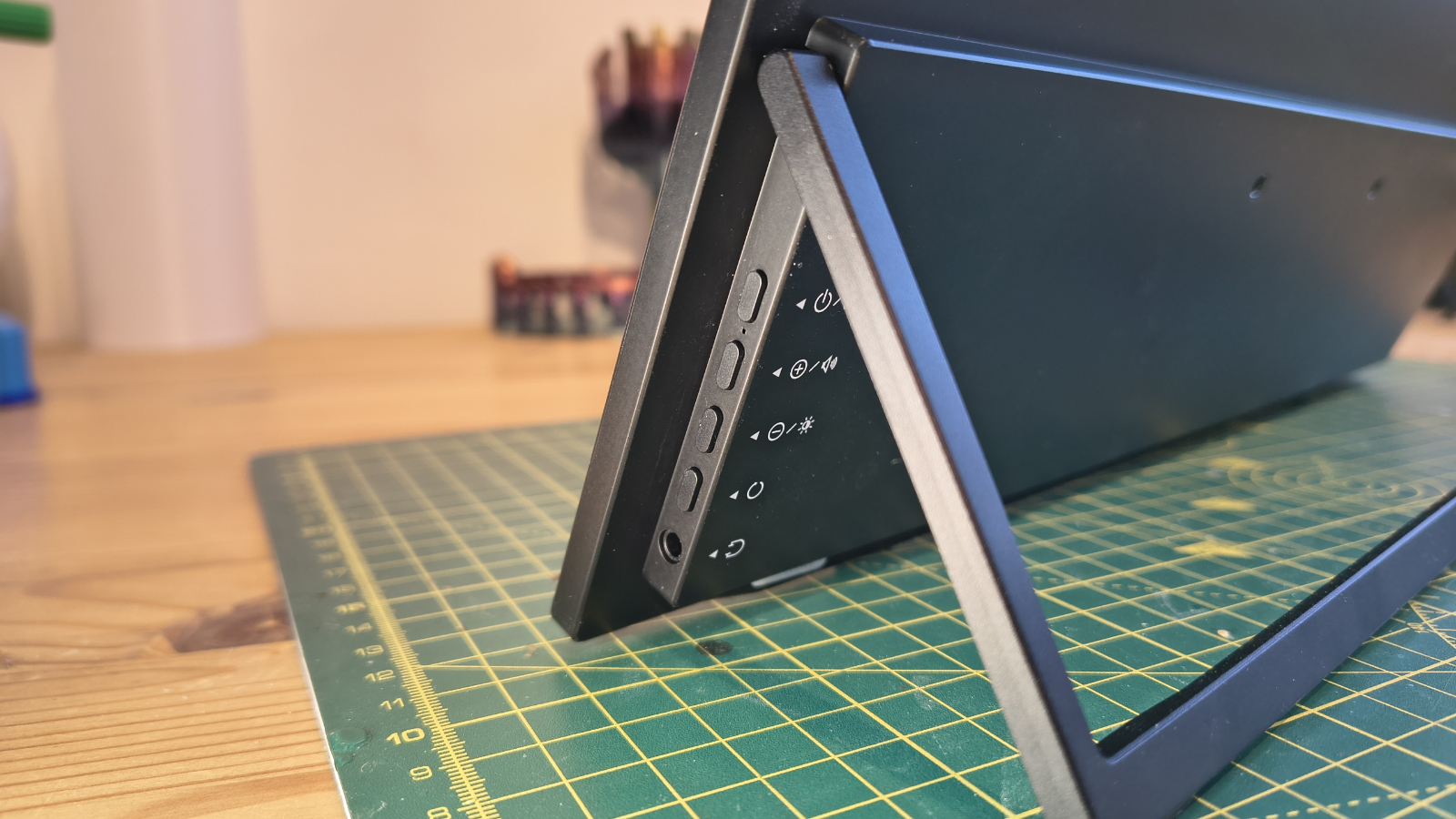
- Lightweight
- Poor port placement
- Versatility
What anyone travelling is most interested in is the weight of devices like the UFree V, since carrying it around will ultimately decide whether it's used.
Thankfully, and somewhat amazingly, even with all the cables and PSU, this device is only a little over 2kg. And if you decide not to bring all the accessories, things become even lighter.
The form factor is basic, with a 15.6-inch 1080p panel that rests in landscape mode on two rubber feet with a folder-out foot determining the viewing angle.
It is possible to use it in portrait mode, although that causes some issues with the cabling due to the placement of the ports and controls.
What I really didn’t care for was that the support covers up the three ports and the controls when it is folded flat, and that could be even more of a problem if you VESA mount the screen, since the foot won’t be able to sit flat. Having the support potentially guillotining the USB-C and HDMI cables when the support is pressed down seems a less-than-ideal scenario.
On the left are two USB-C ports and one HDMI mini, and a cable is provided to enable a full-size HDMI to be connected to the latter. The USB-C ports are multifunctional: you can use USB-C as a display connection from two sources, and they can also power the panel and charge its internal battery. If you use HDMI as the display connection, the screen must use either battery power or the provided USB-C PSU.

For most screens, that would be plenty of inputs, but the Ufree V also supports a wide range of wireless connectivity, such as MiraCast, so it's entirely possible to arrive only with the screen (battery charged) and use it without any cables whatsoever.
That makes this a truly flexible solution, since you can connect a phone or a laptop, and with the provided Bluetooth keyboard, you could even use something like a Raspberry Pi on this display.
From a design perspective, it would have been better if the inputs and the OSD controls had not been covered by the stand. And, I should also make note that placing the inputs on the left was a poor choice over putting them on the right. That’s because the majority of laptops put their USB-C and HDMI on the left also, forcing the user to put the Ufree V on the right of their laptop.
I realised that UPerfect identified their mistake when I noticed that one of the accessories they offer beyond what’s in the box was a USB-C female to male adapter in a U-shape. This adapter allows the connecting USB-C cable to come from the right side of the screen instead of the left.
Despite the port placement issue, this is a highly flexible design that provides an additional screen, and by using the built-in battery, it also doesn’t drain power from the host system.
- Design: 3.5 / 5

UPERFECT UFree V: Performance
- Better than 300 nits
- 80% sRGB
Colour Gamut
Percentage
sRGB
80%
AdobeRGB
62%
P3
62%
NTSC
59%
Rec2020
44%
Gamma
2.1
Brightness/Contrast
Maximum Brightness
347.6
Maximum Contrast
1250:1
Given the price of this screen, I wasn’t expecting anything special about the quality of this IPS panel, and it delivered almost exactly what I predicted.
The results were also oddly familiar, as they were almost identical to the KYY X90E I reviewed, as I presume they both use the same underlying panel.
In terms of colour representation, this isn’t great, managing only 80% of the sRGB gamut, but on the upside, brightness and contrast are decent.
I should also say that testing this panel with the Datacolor Spyder X2 Ultra proved more difficult than usual, as the panel only steps its brightness in ten levels. Since the brightness testing asks for 25% and 75%, that part of the testing was slightly fudged.
Also, operating the OSD menu with four buttons you can’t see is a royal pain, and you really need to develop an app or add a joystick control to this device. The menu is something most users will likely use only once because it's so annoying to navigate.
The weaknesses of this hardware are a mediocre tone response and poor white point. And with all these lightweight panels, luminance uniformity is a major low point. The brightest part of the screen is the middle, and each corner is at least 10% darker; in one instance, 20%.
For those not in direct sunlight, it's good enough to work with, but it's hardly a cutting-edge display.
How high you set the brightness is the critical factor in how long the 8000mAh battery onboard lasts, with UPerfect quoting up to four hours of use. I set the brightness to 10 (100%), connected a phone via Miracast, set a 30-minute timer, and left the battery at 98%.
Amazingly, after 30 minutes of running a YouTube video from the phone, it had used only 11% of the capacity. That would infer more than four hours running with the brightness at max, which is an excellent result.

- Performance: 4 / 5
UPERFECT UFree V: Final verdict
There is an odd contradiction about this hardware where relatively few aspects are in the middle, and most are either wonderful or dire.
In the plus corner is undoubtedly the low asking price, the input flexibility, being able to run from an internal battery and the great portability. Opposing that is a kick-stand that wants to cut off the cable and obscure the controls, a panel where the backlight isn’t evenly distributed, and port placement that didn’t take into account current laptop designs.
Yet despite how many points are on the wrong end of this scale, there is something wonderfully freeing about a device this flexible and so cheap.
I wouldn’t normally suggest that a hardware maker raise their prices, but perhaps what would be acceptable is for UPerfect to revamp this design with maybe a better panel, a bigger battery, and a kickstand that doesn’t obscure ports and inputs. Because if they did that, then they could ask for more money and still get a significant number of sales.
The Ufree V isn’t perfect by a long way, but for those on the move, it could be the flexible second display they need and can afford.

UPERFECT UFree V Portable Monitor: Report card
Swipe to scroll horizontallyValue
Cheap from online retailers
5 / 5
Design
Placement of ports and kick stand is an issue
3.5 / 5
Performance
Other than brightness uniformity, these are decent monitors
4 / 5
Total
Excellent value for money and a highly flexible solution
4.5 / 5
Should you buy a UPERFECT UFree V?

Buy it if...
You have a laptop without USB-C or HDMIIt is possible to drive the Ufree V using Miracast without the need to physically connect it, and it can run on battery power. That reduces the potential power consumption on a connected laptop, since it won’t power the screen while it is being used.
You travel light and need a second screenWhen the weight of the display and accessories is combined, the total weight is 2200 g. However, the screen alone is only 788g, and it is possible to use Miracast and the internal battery to take that on its own and still use it. Just make sure you have a USB-C power adapter for your laptop or phone that can charge the screen.
Don’t buy if...
You need color accuracyThis monitor has a limited colour gamut for a portable display, although the colours it does include are mostly represented well. If you are promoting a product where colour is essential, then this probably isn't the best choice.
For more options, we've reviewed the best monitors for a dual-screen set-up.
UPerfect UFree V: Price Comparison
 No price informationCheck Amazon Singapore
 No price informationCheck Lazada SingaporeWe check over 250 million products every day for the best pricespowered by
 Mark Pickavance
Mark is an expert on 3D printers, drones and phones. He also covers storage, including SSDs, NAS drives and portable hard drives. He started writing in 1986 and has contributed to MicroMart, PC Format, 3D World, among others.
View MoreYou must confirm your public display name before commenting
Please logout and then login again, you will then be prompted to enter your display name.
Logout Back To Top Read more UPerfect Delta Max Touch portable monitor review
 UPerfect UColor O Lite portable monitor review
 MSI Pro MP165 E6 portable monitor review
 Lenovo ThinkVision P27Q-40 monitor review
 LG UltraFine 6K Evo 32U990A monitor review
 BenQ PD2706QN QHD monitor review
Latest in Pro
BenQ PD2706QN QHD monitor review
Latest in Pro
 EnGenius ECW520 budget Wi-Fi 7 access point review
 HPE warns of dangerous security flaw which could allow Aruba OS password resets
 Business landscape is about to undergo a seismic transformation driven by AI agents
 Amazon is making even senior engineers get code signed off following multiple recent outages
 'We are reimagining how people create content': Your Google Workspace apps are getting a major Gemini-powered upgrade
 Asus routers hijacked to power dangerous cybercrime proxy network - here's what we know
Latest in Reviews
EnGenius ECW520 budget Wi-Fi 7 access point review
Asus routers hijacked to power dangerous cybercrime proxy network - here's what we know
Latest in Reviews
EnGenius ECW520 budget Wi-Fi 7 access point review
 John Carpenter's new game captures the cheesy magic of 80s action horror movies
 Pokémon LeafGreen review: my first-ever Pokémon adventure is still superb
 Apple MacBook Neo review: the best budget laptop you can buy
 GreedFall: The Dying World review: RPG prequel fails to offer anything that hasn’t been done better a hundred times before
 MSI Prestige 14 Flip AI+ review: an impressive 2-in-1, but there are a few drawbacks
LATEST ARTICLES
MSI Prestige 14 Flip AI+ review: an impressive 2-in-1, but there are a few drawbacks
LATEST ARTICLES- 1This bizarre indie game challenges you to ‘rizz’ monster girls in a fantasy dungeon
- 2John Carpenter's new game captures the cheesy magic of 80s action horror movies
- 3Pokémon LeafGreen review: my first-ever Pokémon adventure is still superb
- 4The MacBook Neo isn't just cheap — it's cheaper and easier to repair too
- 5Google rolls out unskippable ads to YouTube's TV experience to lure more Premium users